TableWindow Object
Summary
The window where a tabulated field quantities along the contour is displayed.
Details
TableWindow object represents a postprocessor's table view.
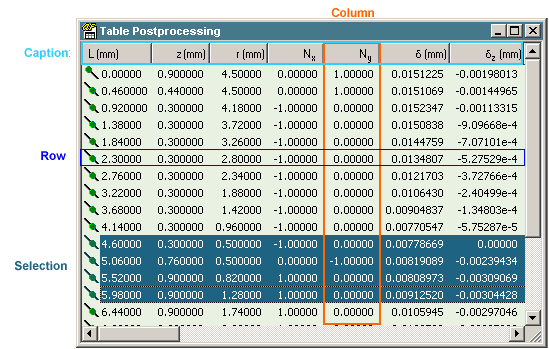
Each row in the picture represents a point on a contour. The distance between the point and contour starting point is show in the Distance L column. Some rows can be selected by user or programmatically.
The TableWindow object is derived from the general Window and inherits all its methods and properties. Each TableWindow is a member of the Windows collection. In addition, TableWindow contains two collections: Columns property returns Columns - a collection of table columns, and Rows property returns Rows - a collection of table rows. These collections give access to all aspects of the table presentation.
To get the TableWindow you need first define a contour in one of the FieldWidow's associated with the Result. When the contour is built, you create the table using GetTable method of Result. If the TableWindow for the contour is already opened GetTable method returns the existing TableWindow.
The following example builds a contour and tabulate it with 100 points:
Dim resWin As FieldWindow
Set resWin = res.Windows(1)
Dim cont As QuickField.Contour
Set cont = resWin.Contour
With cont
cont.AddLineTo QF.PointXY(-15, 35)
cont.AddLineTo QF.PointXY(15, 35)
End With
' Create a table
Dim table As QuickField.TableWindow
Set table = res.GetTable(cont)
' Ask to show value description in the table caption
table.Columns.ShowDescription = True
' Build a table of 100 rows
table.Rows.TabulateNumber 100